Scratch Loops

Scratch continues to be a really fascinating platform. I look forward to having more time to play with it in the future. This week we dabbled with loops and clones creating two games that are based on the cloned sprites and are similar to the earliest video games. I realize that what we are doing very primitive, but I am still proud of our contribution to the scratch projects.

I hope that I can get a jump start on the activities for next weeks projects. It’s nice to see so many talent programmers in our class. They seem to be full of great ideas and feedback on our results.

Project 1 – Save the River

This game is for students to practice some ecology through a game.

Project 2 – Help Dan Eat a Healthy Snack

This is made for students to practice healthy eating habits.
Deep Scratching

Seems like every time you think you have mastered this program, new things unveil themselves. I enjoyed working with Scratch this week. I feel like when I have an idea, I now know exactly how to tell the program to do what dreaming up in my head. I know that there is still much more to learn, but I think that I have a level of comfort working with the program that is satisfying.

I am writing this having only finished on of the two project for the week. I decided to see what others are doing and noticed that they too avoided the line follower project. It seemed a little hairy and prone to nuance. I also didn’t a lot of application in that particular game for in the classroom. However, I could see how a similar styled game could be useful given another design.

I look forward to seeing what I end up creating this week. I’d really like to get ahead too and possibly do next weeks assignments as well.

Cheers and happy scratching!

Working with Maker Blog Entry 2

When I was a child, I enjoyed Lego sets, Brio trains, my uncle’s old erector sets and the sorts of tactile tasks we had to do to earn Cub Scout badges. It was a pleasure to take arbitrary 3d shapes and using my hands craft them into recognizable structures that fulfilled some aspect of imaginative play. As I grew up, my parents being much older and less technologically inclined than most of my friends’ families, we were the last to have a computer. And I didn’t really see anything of it other than an internet browser and word processor.  I missed out on the earliest Mac computers and the 486 PC’s, because they were seen as mostly for early computer fanboys and not really too practical for the average American family. And even though Window’s 95 came to be a very useful and accessible operating system, I think that a lot of the important creative potential of computers remained alien to most people because of this ease of access. As a result, most of us never got a chance to explore coding. Or see computer code as a medium for creative output using a command prompts and scripts.

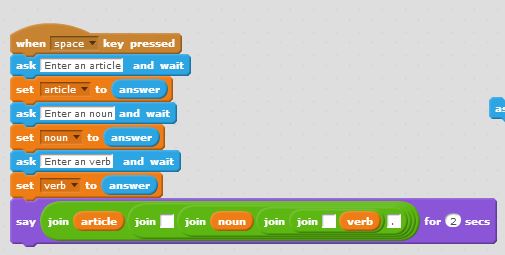
I see Scratch as a way to undo the many abstractions created by the family friendly operating server. The program give individuals tools to create something new. It’s all about control. I think in that way it is very egalitarian. I came to this realization as I was struggling with the problems in Chapter 5 of the text. It is often said when was one is struggling with a concept you should “sleep on it” and in the morning clarity will find you. This was very true for the problems I struggled with over the weekend and last week. Especially concerning the problem (#5) that asked us to create a program that wrote a simple three word sentence script. I could not understand how to create the script so that they sprite would not just repeat the answer to the last question three times. Suddenly, I understood how the variables are meant to be used appropriately and it all made sense.

problem 5 noun article verb

Week 4 – Procedures

Project 1: Cats and Metric Conversions

This week I took on two projects from the Scratch text. One was a simple conversion project. This project was quite dull however gave a great template with many different applications in the classroom. I used the text project file and adapted to entertain me and give useful information on metric conversions. The resulting project shows very colorful cats dancing around a screen displaying different metric conversions of meters and kilometers.
//scratch.mit.edu/projects/embed/77693570/?autostart=false
Project 2: Winder Wonderland

This project asked for a writing program designed to program a set of procedures for the scrip to follow concerning the writing of a snowflake. I took this idea to make a sort of randomized scripted Winter Holiday e-card. The program initially just drew a snowflake with a set of dictated procedures. I took this script and created a program that has an alternating background and music added for a bit of humor in the program.

//scratch.mit.edu/projects/embed/77690686/?autostart=false

Week 3 – Costumes

This was a difficult week. I don’t feel completely satisfied with the projects that I worked on. However, I do believe that they could be useful in the classroom.

Project 1: Coordinate Plane Cats

Using the coordinate grid as a background, I designed a script that works kind of like a game. It was be nice to find a way to have the cats say the the coordinate pair as it lands on the blue dot. In an assignment, I would have the students write down and keep track of the coordinate pairs as they land their cat on each one.


//scratch.mit.edu/projects/embed/76573600/?autostart=false


Project 2 – Street Scene with Conversation

This is an adaptation of the walking man script. I thought it would be nice to have a simple scene where two sprites have a conversation. I think that you could have the conversation go on for quite a long time. This might be useful in a foreign language class to teach simple greetings. Or have students reenact a scene from a novel in this scratch format.

That’s all for this week!

//scratch.mit.edu/projects/embed/76574276/?autostart=false


tag: edtech597